N-central Mobile: A New, Modern Mobile Experience

We previously retired the legacy N-central Mobile app following the identification of security vulnerabilities. Rather than reinstating the existing application, we made the decision to build a new N-central Mobile app from the ground up on a modern, more secure foundation, available for both iOS and Android.

Important: The new N-central Mobile app requires N-central 2026.4 or later. The app cannot be used to connect to N-central servers running earlier versions.

After upgrading to N-central 2026.4, users can take advantage of the new N-central Mobile app on iOS and Android, including N-able Login (SSO) and Take Control functionality.

Here are the links to the applications:

Android: N-central Mobile – Apps on Google Play

iOS: https://apps.apple.com/gb/app/n-central-mobile/id421890006

For this first release, we have intentionally focused the experience on Take Control, one of the most frequently used capabilities in the previous mobile app. This enables technicians to quickly access and remotely support managed devices while on the go, while giving us a strong foundation on which to expand the mobile experience.

With the new N-central Mobile app, you can:

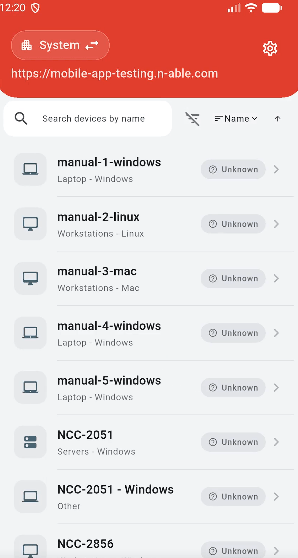
  • Select a customer or site and quickly navigate to its devices.
  • Search and filter the device list to find the device you need.
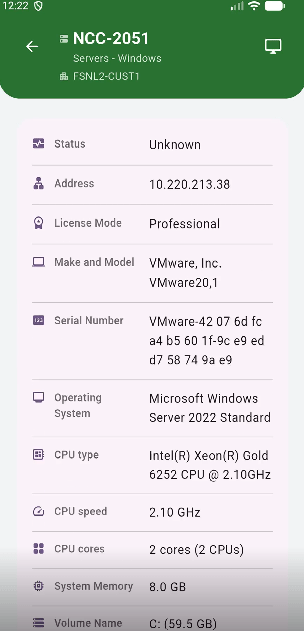
  • View key device details at a glance.
  • Launch Take Control remote sessions directly from your mobile device.
  • Use the app on both iOS and Android devices.
  • Benefit from a modernized foundation designed for improved security, performance, and stability.

What’s Next

This release is the starting point for the new N-central Mobile experience. We are beginning with Take Control and the supporting workflows needed to find and connect to devices quickly.

Over time, we plan to incrementally introduce additional mobile capabilities, informed by partner needs and usage, while continuing to build on the app’s modern foundation.

Sign in with your existing N-central account to get started:

  • Users can authenticate using N-able Login, including MFA and N-able Login. The Mobile App also supports N-able Login with Entra ID. Note: The app differentiates between local login and SSO login for a streamlined login process.
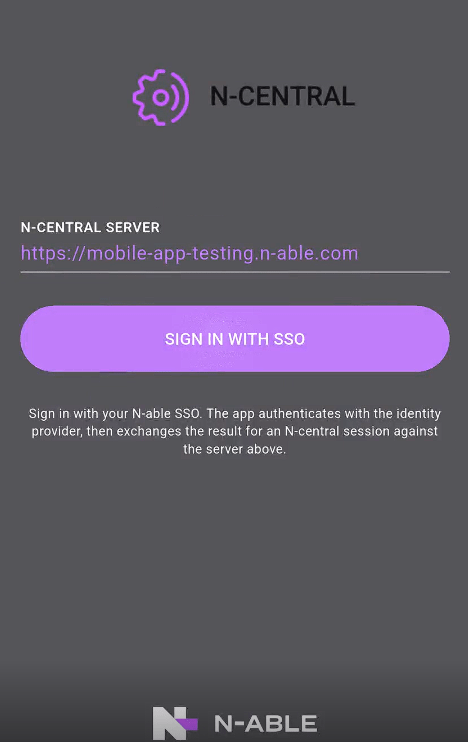
How Login Works:

If Local Login:

  • The app prompts for a password and MFA, then grants access to the product.

If SSO Login:

  • Base N-able Login: The user is forwarded to the N-able Login flow, where they enter their username, password, and MFA (if applicable).
  • N-able Login with a Third-Party IDP: The user is redirected to the third-party provider, follows the external authentication process, and is granted access.
Posted in N-central | Comments Off on N-central Mobile: A New, Modern Mobile Experience

MSP Manager: Mobile – Modernized for iOS

What’s Changed:

The MSP Manager Mobile app has been rebuilt on a modern iOS foundation, providing improved performance and stability while maintaining the workflows technicians use to manage their work from anywhere.

With the updated MSP Manager Mobile app, you can:

  • Manage tickets, customers, contacts, and on-site work from one mobile app
  • Sign in securely using SSO, PIN, or biometrics
  • Track time while on the go
  • Add notes and attachments directly from your mobile device
  • Benefit from performance and stability improvements delivered through the app’s modernized iOS foundation

The rebuild maintains the core MSP Manager workflows technicians already know while providing a more modern and reliable foundation for future mobile improvements.

Getting started:

Log in with your existing MSP Manager account to get started.

Posted in MSP Manager | Comments Off on MSP Manager: Mobile – Modernized for iOS

What’s New in Cove 26.8 – HaloPSA Auto Customer Mapping

In Cove 26.8, we’ve introduced automatic customer mapping for our integration with HaloPSA to reduce the manual effort required to connect Cove customers with their corresponding HaloPSA customers.

This release also delivers continuity improvements designed to strengthen recovery flexibility, reliability, and security.

Continue reading →
Posted in Cove Data Protection, Cove Data Protection release notes | Tagged , | Comments Off on What’s New in Cove 26.8 – HaloPSA Auto Customer Mapping

Patch Management Engine (PME) 2.13.19GA

Patch Management Engine (PME) 2.13.19 GA is now available and has been rolled out to all assets. This release fixes two issues affecting patch scanning on Windows devices.

Continue reading →
Posted in N-central, N-sight | Comments Off on Patch Management Engine (PME) 2.13.19GA

N-zo Reaches General Availability on September 15

This is the milestone we have been building toward. Since Public Preview opened in April, partner feedback has driven real improvements across N-zo: faster responses, more accurate answers, and a wider range of things it can help with. On September 15, 2026, N-zo moves out of Public Preview and into General Availability. Here is what changes at GA, how credits and pricing work, who controls access, and what we are building next.

Continue reading →
Posted in N-central, N-sight | Comments Off on N-zo Reaches General Availability on September 15

MSP Manager: Ticket Search Improvements

Ticket search in MSP Manager has been significantly improved. Results are now more complete, better ranked, and faster — making it easier to find the right ticket whether you’re searching by keyword, ticket number, customer name, or a phrase from a ticket’s description. Be sure to check the Tips for Getting the Best Results section at the end of this post to get the most out of these changes.

What’s Changed

More Complete Results: Searches now return the full set of matching tickets across your account, including for broad or commonly used terms that previously returned incomplete results.

Partial Word Matching: You no longer need to type a full word to find a match. Typing licen will return tickets containing “license” or “licensing.” This is especially useful when you can only remember part of a term or want to cast a slightly wider net.

Improved Ticket Number Search: Ticket numbers can now be searched with or without the # prefix — both work reliably. Matching begins from the start of the number, so searching 891 will find ticket 891 as well as 8912.

Broader Coverage: Search covers ticket titles, descriptions, replies, time entries, and expenses — as well as customer, contract, project, contact, and assignee names. These are all searched automatically, so you don’t need to remember exactly which field a piece of information lives in.

Smarter Result Ordering: Results are now ranked to surface the most relevant tickets first.

Continue reading →
Posted in MSP Manager | Comments Off on MSP Manager: Ticket Search Improvements

N-central 2026.3 Hotfix 2 – Additional Mitigation for CVE-2026-18577 

Download

CMMC Download (For CMMC Subscribed Accounts) 

Build Number : 2026.3.1.10   

Last Updated: Aug, 6th 2026 

This release supersedes N-central 2026.3 Hotfix 1 (build 2026.3.1.7). To find out everything contained in the 2026.3 release, click this link for the full 2026.3 release notes.

As our investigation into the recent N-central security vulnerability (CVE-2026-18577) continues, we are proactively expanding protections in response to ongoing monitoring of threat actors as they evolve their attack techniques. 

This is not a duplicate of our previous communication — Hotfix 2 is required, even if you already applied the earlier hotfix. Hotfix 2 supersedes Hotfix 1 with additional hardening measures to further protect you and your customers. It is highly recommended that all partners upgrade to this hotfix ASAP. 

Additional Information: 

Hosted N-central – No action required 

If you are on an N-central hosted instance (NCOD), mitigations have already been applied to your environment. You do not need to do anything at this time. 

N-central (on-premises) – How do I upgrade to the hotfix? 

Download and upgrade to 2026.3.1.10 using the instructions provided below and on the N-able support portal. If you need assistance with the upgrade process, please contact our support team at https://me.n-able.com/s/ 

Upgrade Documentation: https://documentation.n-able.com/N-central/userguide/Content/ReleaseDocs/Install_Config/InstallConfig_Upgrade.htm 

Upgrading from legacy versions: https://documentation.n-able.com/N-central/userguide/Content/ReleaseDocs/Release_Notes/upgrade_path.htm 

Supported Upgrade Paths 

  • Upgrade directly to 2026.3.1.10 from:  
  • 2025.4 
  • 2026.1 
  • 2026.2 
  • 2026.3 
  • 2026.3.1 (Hotfix 1) 

If you are on an older version, we recommend going to any of the builds above, then upgrading to this hotfix version ASAP. If you are unsure of what to do, you can contact support directly. 

Do I need to update my agents too? 

While the hotfix itself does not require agents to be upgraded to protect you from CVE-2026-18577, it is still recommended that you upgrade the agent once you install the hotfix to ensure you have all the latest features and security fixes applied. 

For More Information: 

Support: https://me.n-able.com/s/ 

Uptime Page: https://uptime.n-able.com/ 

Posted in N-central | Comments Off on N-central 2026.3 Hotfix 2 – Additional Mitigation for CVE-2026-18577 

MSP Manager: Service Plan & Ticketing Improvements

This release introduces a set of improvements to how service items and service plans are managed in MSP Manager. The updates focus on three areas: better visibility into expired service items, uninterrupted ticketing workflows, and greater flexibility when configuring the lifecycle of service plans.

What’s New

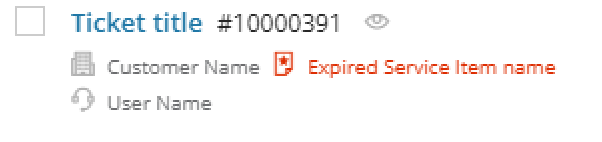
  • Expired Service Item Indicator on Ticket List and Ticket Editor
  • Ticket Creation Allowed for Expired Service Items
  • Never Expiring (Auto-Extended) Service Items
  • Improved Service Plan Duration Management

Feature Details

Expired Service Item Indicator on Ticket List and Ticket Editor

Tickets associated with expired service items are now clearly flagged directly in the Ticket List and Ticket Editor. You no longer need to navigate to the service plan to check whether a service item is still active — the indicator is visible right where you’re already working.

This makes it easier to catch expired agreements during day-to-day support operations and prioritise any renewals or follow-ups without disrupting your workflow.

Continue reading →
Posted in MSP Manager | Comments Off on MSP Manager: Service Plan & Ticketing Improvements

N-central 2026.3 Hotfix 1 – Mitigation for CVE-2026-18577 

Release Note Details 
Download
CMMC Download (For CMMC Subscribed Accounts)

Build Number : 2026.3.1.7 
Last Updated: 02-August-2026 

This release is based on 2026.3.0 which was release on ‘July 30th 2026’ . To find out all that is contained in the 2026.3 release, you can click on this link to see the full 2026.3 release notes. For more details on what else is included in this hotfix release itself, please click this link.  

N-able was recently made aware of a security issue affecting all N-central instances not running 2026.3.1 (CVE-2026-18577)

It is highly recommended that all partners upgrade to this hotfix ASAP to protect themselves. 

Additional Information:

Hosted N-central – Upgrade will be applied automatically 

If you are on a N-central hosted instance (NCOD), you will be notified directly of the upgrade schedule for your server, and you do not need to do anything at this time.  

N-central (self-hosted) – How do I upgrade to the hotfix?  

Download and upgrade using the instructions provided below and on the N-able support portal. If you need assistance with the upgrade process, please contact our support team at https://me.n-able.com/s/  

Upgrade Documentation: https://documentation.n-able.com/N-central/userguide/Content/ReleaseDocs/Install_Config/InstallConfig_Upgrade.htm 

Upgrading from legacy versions: https://documentation.n-able.com/N-central/userguide/Content/ReleaseDocs/Release_Notes/upgrade_path.htm 

How do I find out if I have been impacted ? 

To detect if you have been impacted, review devices users’s documents folder for a file called ‘’svchost.exe’’, as well as look for a registered service name called ‘Cloudflared’.  

Additionally, you can look at your firewall logs for any inbound connection from any of those IPS: 

(Go here for the latest updates)

173[.]249[.]252[.]200

87[.]249[.]138[.]34

37[.]19[.]210[.]32

68[.]235[.]46[.]214.
  

If you identify any of these, contact N-able support immediately and engage your own security team.  

Supported Upgrade Paths 

  • Upgrade directly to 2026.3.1 from 
  • 2025.4 
  •  2026.1 
  •  2026.2 
  •  2026.3 

If you are on an older version, we recommend going to any of the builds above. Then upgrade to this Hotfix version ASAP. If you are unsure of what to do, you can contact support directly.  

Do I need to update my agents too?


While the hotfix itself does not require the agents to be upgraded in order to protect you from CVE-2026-18577, it is still recommended that you upgrade the agent once you install the hotfix to ensure you have all the latest features and security fixes applied. 

For More Information:  

 Support: N-able Me  

 Uptime Page

Posted in N-central | Comments Off on N-central 2026.3 Hotfix 1 – Mitigation for CVE-2026-18577 

Adlumin Q2 Wrap-Up: Broader Coverage. Faster Investigation. Stronger Partner Operations.

Q2 delivered decisive progress on three fronts: expanding threat detection into blind spots, accelerating incident investigation, and removing operational friction for partners. The quarter reflects a shift toward platform-level capabilities that help security teams detect what matters, investigate faster with confidence, and respond at scale.

Continue reading →
Posted in Adlumin | Comments Off on Adlumin Q2 Wrap-Up: Broader Coverage. Faster Investigation. Stronger Partner Operations.