
This is the milestone we have been building toward. Since Public Preview opened in April, partner feedback has driven real improvements across N-zo: faster responses, more accurate answers, and a wider range of things it can help with. On September 15, 2026, N-zo moves out of Public Preview and into General Availability. Here is what changes at GA, how credits and pricing work, who controls access, and what we are building next.
At a glance
- General Availability: N-zo becomes generally available on September 15, 2026
- Free credits continue: every user keeps 100 free credits per month (1 chat = 1 credit)
- Credit packages: 150 credits for $100 per month or 400 credits for $175 per month, available soon (each user receives the additional credits)
- You stay in control: partners can opt out in advance starting today, and can disable N-zo at any time
- Coming soon: reboot a device directly from chat, the first of many in-chat actions
What General Availability means for you
On September 15, 2026, all users who meet the minimum requirements will have access to N-zo unless an administrator disables it. There is nothing you need to do to turn it on.
If you would rather wait, you can opt out before GA begins. Starting today, partners can pre-opt out, and administrators can disable N-zo at any point in the future. The choice stays yours, before and after GA. (see below)
Credits and pricing
The 100 free credits per month that each user received during Public Preview continue into GA, where one chat equals one credit. If you reach the limit, N-zo pauses until the month resets or your organization purchases a credit package.
For teams that need more, credit packages will be available shortly after GA. Each package covers all users in your environment at one predictable monthly price:
- 150 total credits for $100 per month
- 400 total credits for $175 per month
In-chat reboot is coming soon, and it is just the start
Today N-zo helps you find answers faster. The next step is acting on them without leaving the conversation.
The first in-chat action, rebooting a device, is coming soon. A reboot can start in one of two ways: you ask N-zo to reboot a specific device, or N-zo recommends a reboot when it looks like the right fix during troubleshooting.
From there, both paths work the same way. A form opens in the chat naming the device to be rebooted, along with the settings that apply: how long the countdown runs, the message the end user sees, and whether they can snooze or cancel the reboot. Nothing happens until you review those settings and confirm. Once the reboot starts, you can follow its progress in the same conversation.
That form is the pattern we will reuse for every action that follows, including Script Expert:
- Clear intent: N-zo states what it will do, and to which device, before anything happens
- Explicit confirmation: nothing runs until you approve it
- Visible outcomes: progress and results appear in the same chat
- Same permissions: actions respect the access you already have
Getting that pattern right is what makes more autonomous work possible later, with a user approving each step. We will share the reboot release date here as soon as it is confirmed.
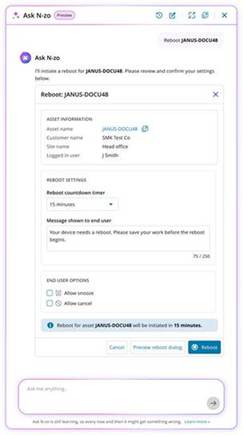
A preview of the in-chat reboot form, coming soon.
Your data and permissions
A reminder as we head into GA: N-zo executes under the rights of the logged-in user. Users cannot take actions or access information that their own account cannot.
For more detail on how we handle your data, read the data privacy FAQ: Here
Read the documentation on how to pre-opt out: Here
You must be logged in to post a comment.