
In Cove 26.6, we’ve made significant enhancements to Cove DRaaS including the ability to expose recovered servers to the internet to keep critical internet-facing services online and the ability to launch remote sessions into recovered servers.
What’s New in the Cove?
Management Console
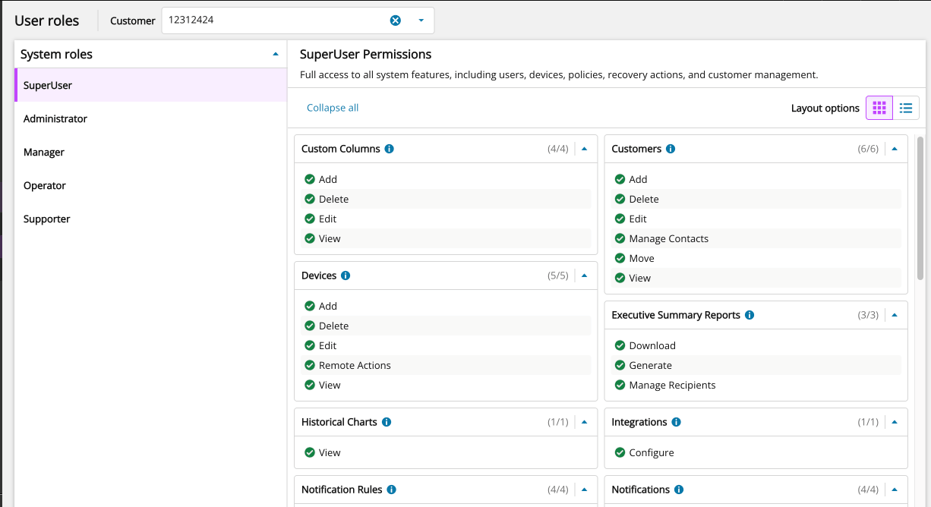
User Roles Management Dashboard (Limited Tech Preview)
The User Roles Management dashboard displays all predefined roles in a structured permissions matrix. This UI provides clear visibility and transparency into what actions different users’ roles can take so that you can easily identify permission gaps or risks in your current setup.
This improvement made to User Roles Management is the first step in our journey toward custom user roles (i.e. granular permission management beyond Cove predefined user roles).
Microsoft 365
Revoked Permissions Notifications
You will now receive alerts when Microsoft 365 permissions are revoked, with the ability to restore access in one-click (i.e. “Grant permissions”).
This update will help you reduce time to detect and resolve permission issues that could have resulted in backup failures without your awareness.
Group-Based Data Protection Improved Visibility & Export
You can now easily view users who are (and are not) protected using selected Entra ID security groups for Exchange & OneDrive backups. This allows you to clearly see which users are no longer governed by group-based policies, safely offboard users to reduce costs, and simplifies auditing with exportable data.
Continuity
Cove DRaaS – Expose Recovered Server to Internet
You can now make internet-facing services reachable from outside networks while you’re failed over from the management console. This allows you to keep critical internet-facing services online for external customers or internal users (i.e. websites, customer portals, intranet portals, mail servers, APIs, etc.)
When you expose a server to the internet, a public IP address is auto-assigned to the recovered VM, and you open the inbound and outbound ports the service needs to be reachable. The recovered VM is placed in an isolated network (DMZ), so only the ports you specify are reachable while the rest of your recovery environment stays private.
Cove DRaaS – Connect to Recovered Server
Every device in failover now has a “Launch Remote Console” button that opens a secure remote session straight to the recovered server (RDP) for quick hands-on access (i.e. confirming a server booted cleanly, checking that services are healthy, pulling a few files, working through a recovery runbook, investigating a machine in an isolated sandbox).
The remote control agent is auto-installed while the device is being recovered, meaning there is no VPN or public exposure that you need to set up.
Resources and Events
Cove DRaaS Masterclass

Join us on July 10th to learn how to handle four critical disaster recovery scenarios—DR testing, single-server failover, full site loss, and ransomware cleanroom recovery using Cove DRaaS. Register here
Become a Master of Disaster Recovery
Join this interactive masterclass on July 15th that prepares you and your team to respond before disaster strikes. Register here
Office Hours: Cove Data Protection

Join Head Backup Nerd, Eric Harless, and Product Management guests on July 27th for Q&A, roadmap updates, practical automation and scripting insights, and to improve your overall chance of a successful data recovery. Register here
Configuration Health Check
Schedule a free, in-depth engagement with a Cove expert to help you uncover unknown gaps in your backup health and configurations that could undermine your recovery efforts. Schedule now
Cove 26.5 Release Notes
Cove 26.5 delivered a native integration with HaloPSA which is designed to streamline ticketing workflows by auto-creating tickets for detected backup failures directly in your HaloPSA environment. Read now
Legal Disclaimer: Any usage of the product while in Limited Tech Preview or Public Preview is provided as part of early access. Features may change before General Availability, and performance or availability is not guaranteed.

You must be logged in to post a comment.