
Direct access to billing, PDF invoice exports, and a filter-based knowledge tree help simplify everyday workflows and put what you need closer at hand.
Billing, right from the main menu
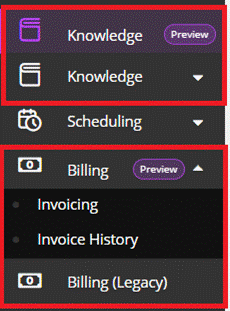
Billing now has a dedicated place in the main menu, giving you direct access to invoicing and invoice history from anywhere in MSP Manager.
You can also export invoices to PDF from the new billing experience, making it easy to save, share, or use invoices outside MSP Manager.
The main menu: new Knowledge and Billing carry the Preview badge, and the original options remain below them.
Find the knowledge you need more easily
The new knowledge tree gives you a simpler way to navigate your knowledge library. Instead of working through a long, nested submenu, you can use filter categories including categories that weren’t available in the previous menu, to narrow the list and focus on the knowledge items relevant to the task at hand.

The new Knowledge Tree: filters on the left, the matching knowledge items listed in the main area.
Move to the new experience at your own pace
The new billing and knowledge experiences are available in Preview. During the preview period, the previous experiences remain available, allowing you to explore and become familiar with the new experiences while keeping the familiar ones.
You must be logged in to post a comment.