
We’re introducing significant improvements to Automation Manager, making it easier to build, maintain, and modernize automation policies.
This release adds support for PowerShell 7 through a new automation object, while also delivering a much improved script editing experience for Automation Manager users.
Availability
These Automation Manager improvements are available across N-able platforms:
- N-sight — Already available. No action required.
- N-central — Available by applying the N-central 2026.3 Hotfix 1
- N-central 26.4 — These features will also be included when N-central 26.4 is released.
PowerShell 7 Support for Automation Policies
Automation Manager now includes a new Run PowerShell 7 Script object, allowing automation policies to execute scripts using PowerShell 7.
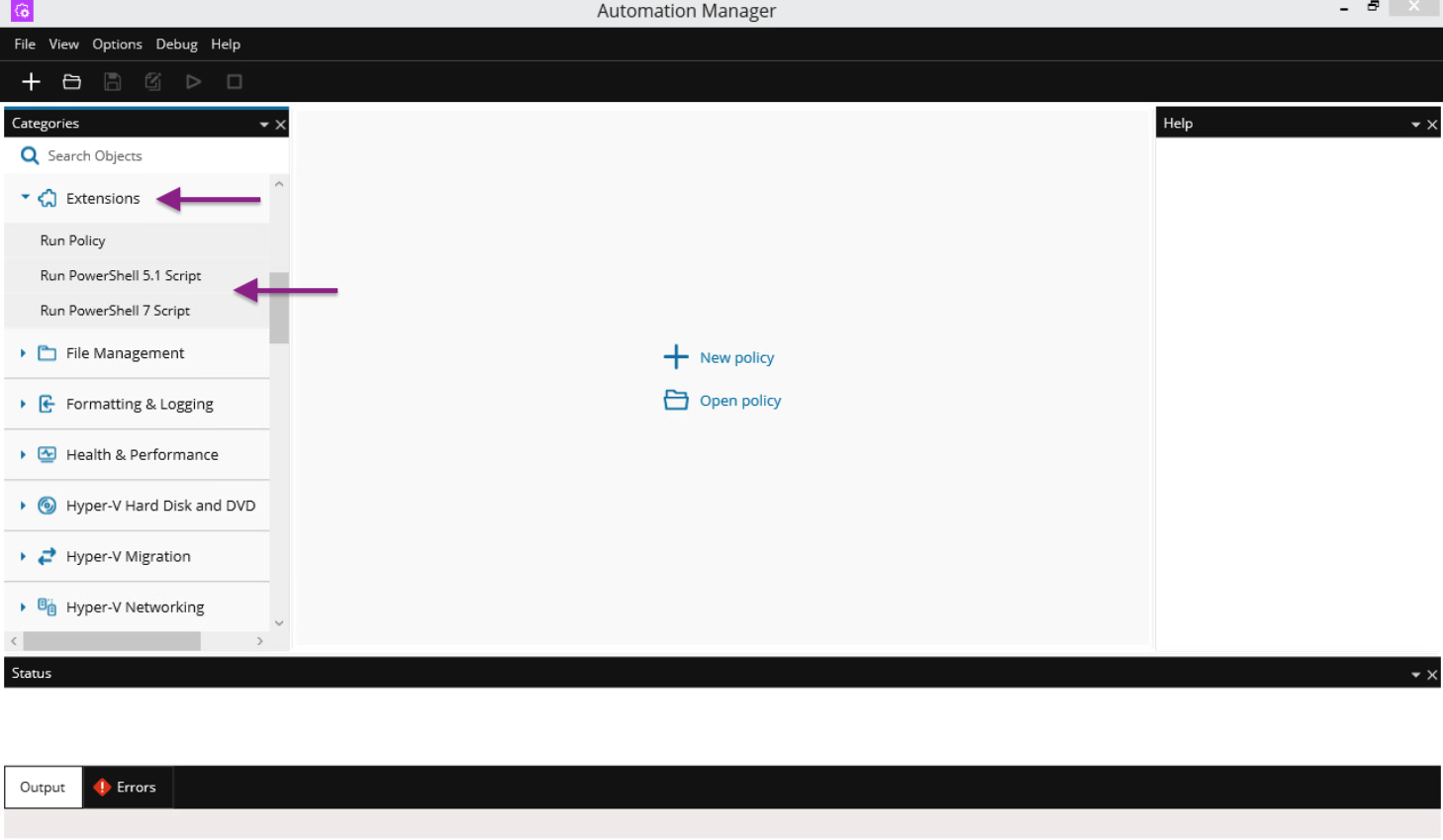
This gives partners access to a more modern PowerShell runtime for new automation scenarios, while preserving compatibility with existing automation policies.
The existing Run PowerShell Script object will be renamed to Run PowerShell 5.1 Script. It will remain available without any additional changes and continues to use Windows PowerShell 5.1.
This allows partners to adopt PowerShell 7 at their own pace without disrupting existing automation workflows.
No additional endpoint requirements
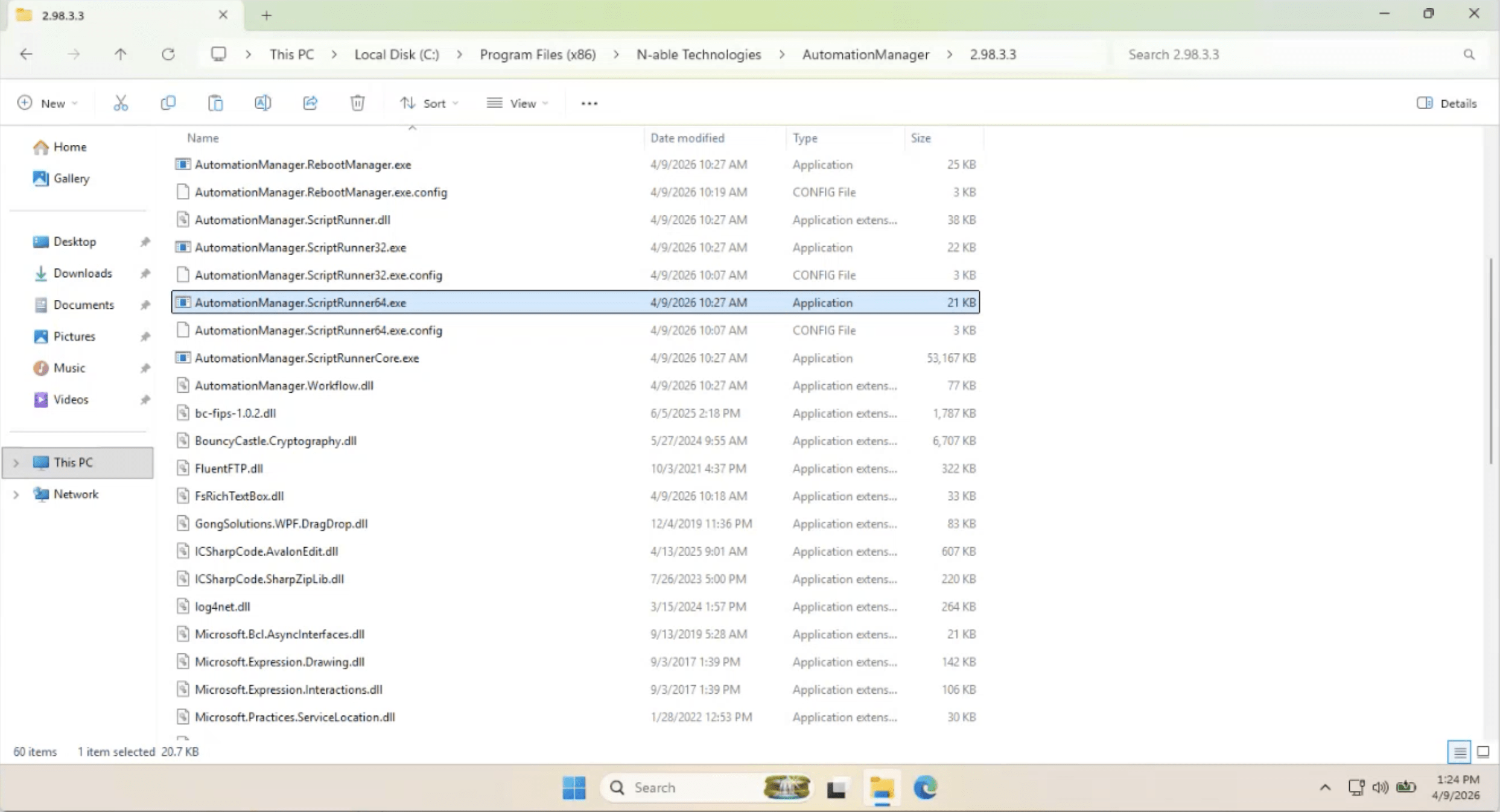
The Automation Manager installer has increased in size by approximately 53 MB. This is because the new Run PowerShell 7 Script object ships with all required PowerShell 7 and .NET runtime components built in, so no installation is required on managed endpoints.
PowerShell Module Support
The new PowerShell 7 object supports standard PowerShell 7 cmdlets and can also use compatible PowerShell modules.
This includes:
- Built-in PowerShell 7 functionality
- Compatible custom modules
- Modules already installed on the managed endpoint, where supported
Because PowerShell 7 differs from Windows PowerShell 5.1, some legacy modules may not be compatible.
Partners using custom or existing modules should validate compatibility before migrating automation policies to the new PowerShell 7 object.
Execution Context Compatibility
The new PowerShell 7 object supports common Automation Manager execution contexts, including:
- Local System
- Custom credentials
- Device credentials
- Currently logged-on user
This helps maintain compatibility with existing automation workflows.
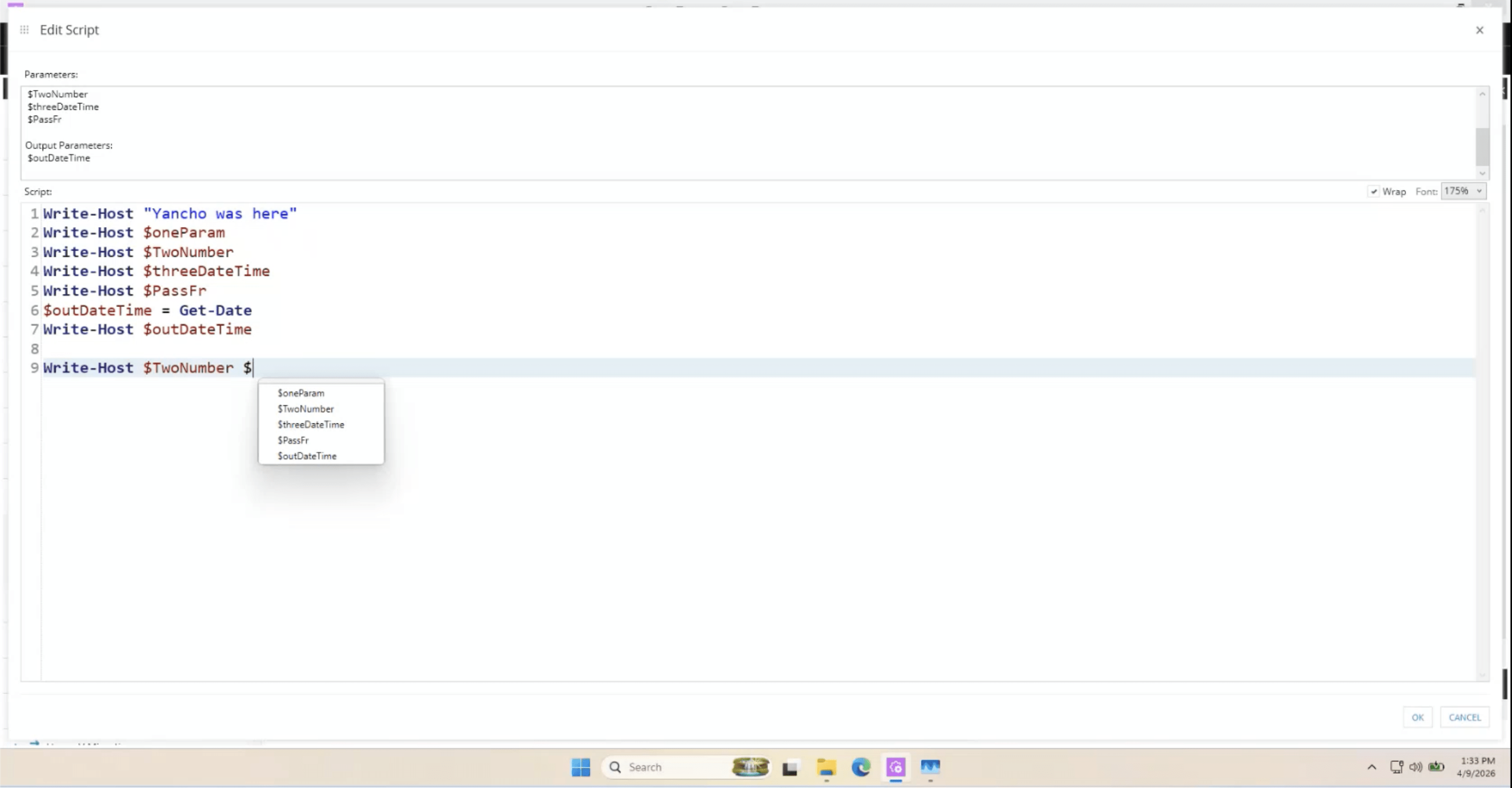
Improved Script Editing Experience
We’ve significantly improved the script editing experience in Automation Manager Designer. These enhancements apply to both:
- Run PowerShell 5.1 Script (previously named Run PowerShell Script)
- Run PowerShell 7 Script
This means all Automation Manager users benefit immediately, even if they continue using existing PowerShell 5.1 automation policies.
Editor enhancements
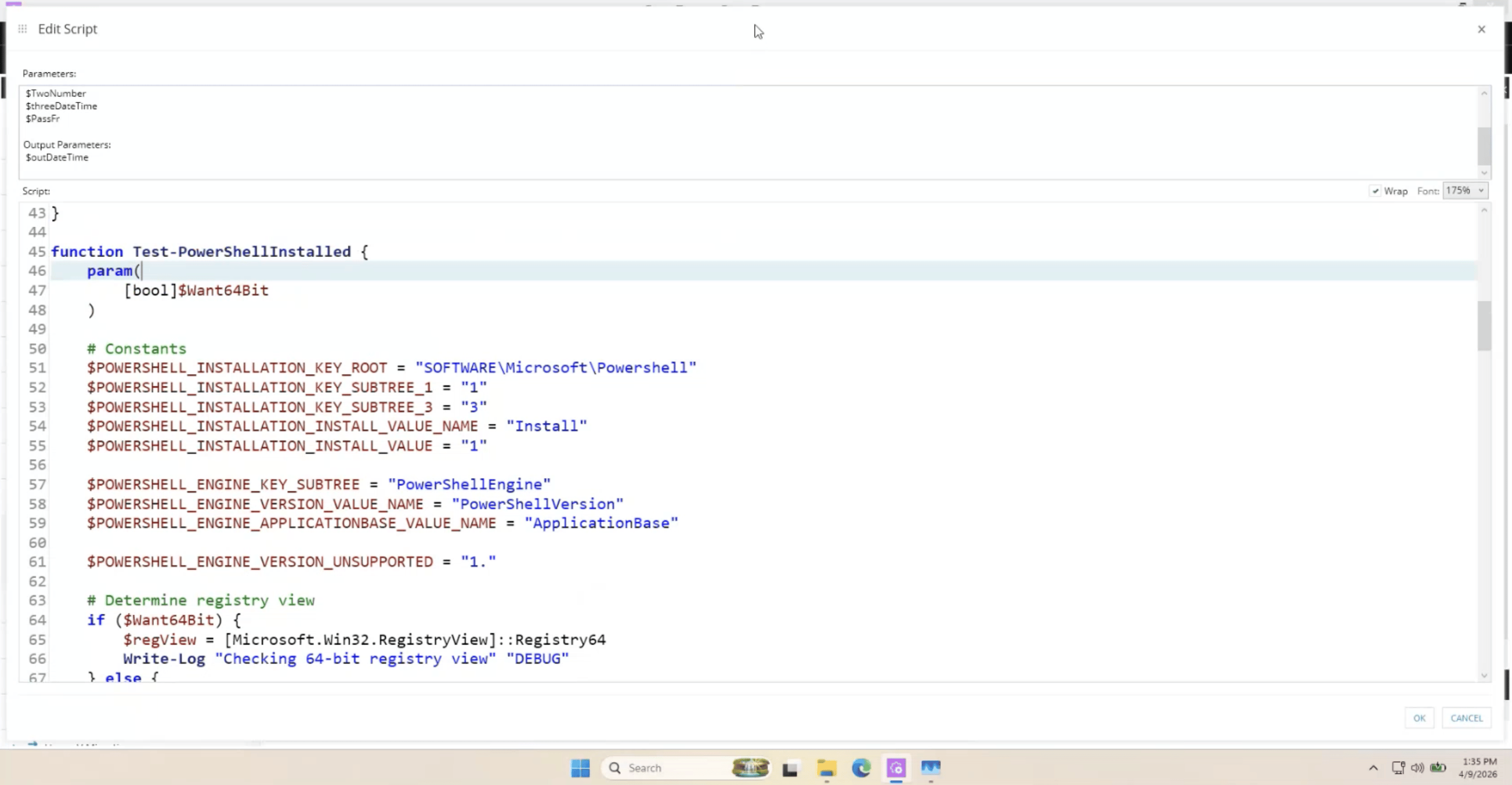
- PowerShell syntax highlighting: Scripts are now easier to read and review with PowerShell-aware syntax highlighting.
- Line numbers: Line numbering makes troubleshooting and script maintenance easier.
- Current line highlighting: The active editing line is now highlighted for improved readability and navigation.
- Parameter auto-complete: Typing
$now presents available Automation Manager input and output parameters for easier insertion into scripts. This helps reduce manual copying and scripting mistakes. - Font scaling and zoom: Users can now increase or decrease editor font size using built-in zoom controls or mouse scroll shortcuts.
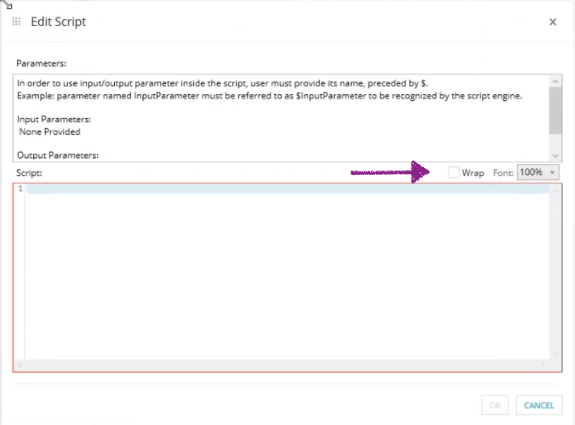
- Word wrap support: Long scripts are easier to read with the new word wrap option.
- Improved editor window behaviour: The script editor now provides a better day-to-day experience by opening maximized by default, and remembering the last window size/position.
Important Notes
In this initial release, the new Run PowerShell 7 Script object supports 64-bit Windows operating systems only.
- Existing automation policies using Run PowerShell 5.1 Script (previously named Run PowerShell Script) continue to function as before.
- Compatibility for some legacy Windows PowerShell 5.1 modules may vary depending on module design.
These enhancements modernize Automation Manager in two important ways:
- Partners can now begin building automation policies with a modern PowerShell runtime.
- Benefit from a much better script authoring experience for both new and existing automation content.
Security & Integrity Information
To assist customers using endpoint protection or application control software, hashes for the executables and associated components are provided below.
| File | SHA-256 Hash |
| AutomationManagerSetup.exe | 75A10CE3D84FE91F72DA6C0A0403B1DE8DAE236B14ED02651941B5A44D45AF93 |
| AutomationManagerUpgrade.zip | 4A175BD6476CD7A0BB5327E2E8C80132EF94136AAD74D2458EFBE0E549704647 |
| 7z.dll | 8DD93ADC6E06CB7A404D259E59B644AD49B69A5D4215DE607BAF659FABFB2C4C |
| AMX.exe | D2A0CC0B04D0C76EBA5DAEDBBA00BC402C8211B0D4D5F0E8E565FAC3795C861F |
| AMX.exe.config | E8B02086ABDBE0FFD50BE6EE4677901BBD7FA5BD46301FB44D86BD6012FD62A8 |
| AutomationManager.AgentService.exe | E9B42D8739CBFD3425E8DC6B5EA17E5C5E73AAEEF36E4FBDD3533FC389B43883 |
| AutomationManager.AgentService.exe.config | EC34807A5618ACB2131373713A397CD380E3D5D93B6C74CDC0A39FCD3DE06F32 |
| AutomationManager.Common.dll | 1151D7892FC28F498E88EB85ACDF703C5630B6735C331274820BEC44CC6B4C34 |
| AutomationManager.Engine.Common.dll | 085343B016063C543E5D336422FF2C06B4426B63CFA53F8B8DB0904A883279E2 |
| AutomationManager.Engine.Common.dll.config | 0660F332EB9341202CEDE01580F55000624569F2D218201A37EC000ABE2F80BE |
| AutomationManager.Engine.dll | 5C6E2DC7B75A219BB675C430F53E3B518A462067CF759C0D162FD5A0B5A211DD |
| AutomationManager.Engine.dll.config | 029B17B916BD114A3AFDE4BFC6EA5045D211659D28306F4D684EF5AE7111B7D5 |
| AutomationManager.Engine.Monitoring.dll | 8228F3C63BCE655C21F968518EABF702F05028141F4417AC042FE0DCCE2F1AC7 |
| AutomationManager.Engine.Monitoring.dll.config | CD3641121A5DE082751B0A400439CEB5AB7CC4779F0241C984D694D3D29F3DC2 |
| AutomationManager.Engine.Update.dll | E81FD20C7C35C668584CA6DC97BFB9720AA8BDF47198283AD0D903FBCFD4E42D |
| AutomationManager.Engine.Update.dll.config | 402189FCE7FD863A281F1FBC2704FE48D14E2A92A99C4E46E261667A50CE8AD5 |
| AutomationManager.InstallerActions.exe | E481F29BE2A262308EA0C829A3F15156F178DBCF20EFC606ACD9A4DD5B690AF4 |
| AutomationManager.Logging.dll | A03FBF77F121399B74369B816C8C5395BED671523D85F0D4D0130071A11E1A8E |
| AutomationManager.PromptPresenter.exe | 4E6EF4AA805413415020A78CEC30FA5A1C06E182772A99BDC90A6CF6C7FF800F |
| AutomationManager.PromptPresenter.exe.config | C66E1BA36E874342CD570CF5BDD3D8B73864A4C9E9D802398BE7F46FE39A8532 |
| AutomationManager.RebootManager.exe | 3E9B496F545C37FE450912D1EA7241D13682D575034ED40859AB745429EDD452 |
| AutomationManager.RebootManager.exe.config | EC1A50D33B1D7DEFBA4CFF499B7EAC129556F4A9DF7460B2E02B883F9D1DD71E |
| AutomationManager.RpcServerApiWrapper.dll | 52CD96D24C9A40A18D0AACE8B195C0D139FCC6C7CF690E3A82FAAC808EC9A1E6 |
| AutomationManager.RpcServerApiWrapper.dll.config | CA5700345B37913C86D3916E3F87B4F3BE52D48A6E13804B0BE23CB46D617849 |
| AutomationManager.ScriptRunner.dll | 8B827B418754F4489D6671102AE51F273E05F948B4FE34182464183AFC50E446 |
| AutomationManager.ScriptRunner32.exe | 3C1F913F76942FB58DD9C74975A87B4894BD226B1D92E59D060C923C46A792CC |
| AutomationManager.ScriptRunner32.exe.config | 0A808D2453CFDF69408CBDFA339BEF5752C19C645184042711E97948555BBA1B |
| AutomationManager.ScriptRunner64.exe | DC56274E12F121A055CBECEFE0F3EA4564153A5510D7E390A81EE3F7DF686EA1 |
| AutomationManager.ScriptRunner64.exe.config | BE3637BC81EF41699694299DE656715B63D9DE42D5AEF17DFD411F760BE0683A |
| AutomationManager.ScriptRunnerCore.exe | 8C4A1D87094DE2B703B7AC2D3A4E0E9D78C72B0E77703F5D97C68AEF5EBC1681 |
| AutomationManager.Workflow.dll | 24AF5285498F18BFA54BAAD11F52E2A52E3E4DA576D6C85B81AEAFAA2AAC5763 |
| AutomationManager.Workflow.dll.config | 0660F332EB9341202CEDE01580F55000624569F2D218201A37EC000ABE2F80BE |
| bc-fips-1.0.2.dll | 8911C42DF2FC915C3C63AACE0DEFAF2B1063FEA5F0E335E330C1B46FF7392A82 |
| BouncyCastle.Cryptography.dll | AEC227154FC549739FF5A07920723641F773CE65D05DCA70B215183C93E9641D |
| Castle.Core.dll | 9B555BC6F25753F1DE58BD5A12C26D21A034914D9B8D56AEE7C4FDB6365F11D2 |
| Castle.Windsor.dll | DAF8CB0A5003B11DEE8ED19E8B275C86C4BC5D4E558C42F5547050E75084A0CC |
| DotNetZip.dll | E11288B9985470BE254CCEAFCEBFC2892731BEA7D23F28DB2E062F6E1F41C985 |
| FluentFTP.dll | 6B53A16C751DDD7401D34630CD744ED7AEF8E240FBEB8C574AB029DC03E0CBD5 |
| ICSharpCode.SharpZipLib.dll | 4B30B23B0D6E42641CF7CA46409258968E3112228202B4B46FC06263EBE9288D |
| log4net.dll | 4FFEECFA1564BCD632891C7E0F376669227ED177E4F34BD8FB25F493162D8C3A |
| Microsoft.Bcl.AsyncInterfaces.dll | D50D47B9C5DE82D563AFF208A600DA56564D055CFED97421685E5475230D3E70 |
| Microsoft.Practices.Unity.Configuration.dll | 1FC2AC4096295700FCDDC896EAA32AABABD421BB962F503E7B525E9103204C24 |
| Microsoft.Practices.Unity.dll | CFF20CF01155DEE730337A5684285B7A39C59B8321BDC242170AE189C3841A19 |
| Microsoft.Win32.TaskScheduler.dll | B185B29B50062038C531C4301129BD06E0D51027E7512C3ECB41569413CEA893 |
| MspPlatform.Common.dll | EFD35D0E64D1C4CDE153E3FBAD635F6B5B1013CF97D442A111697993B3CD8907 |
| MspPlatform.Contracts.dll | 1C75840C248A4342B4F63608D78896C12376C3A0769956A98C6580BA5E078239 |
| MspPlatform.Interop.RpcLibrary.dll | 38EC8BA7D6F65452F1CFCCF56FEA29D3D6FE6AF7603B61CE73B5522C16D4C17D |
| MspPlatform.Logging.dll | 2480D1F24D0D052DDBFB8ED8AD9E2764CADF6C87A61EEE785853F310E952509B |
| MspPlatform.RpcLibrary.dll | CB0383868B404645539AAE94467ABA7D9F840BE1CE2B94D36494CBCCEBC70933 |
| Newtonsoft.Json.dll | B624949DF8B0E3A6153FDFB730A7C6F4990B6592EE0D922E1788433D276610F3 |
| NUSClientPublic.dll | CB081E54D106FD5131A610876DB222CC70C1D66785E6DB13B204321A9E886E19 |
| NUSPublic.dll | 2887BB8CB7386147FCD91AA6B81DB92CD7D28BC2FAE5F178ED0B677CBA29E397 |
| PolicyExecutionEngine.dll | 7742FCC8A76C6AD7B4F57DCF719A79864791952AC608A913F7E5F05972A75988 |
| PolicyExecutionEngine.dll.config | 7996123C7FBC913FD3445F38BAE1C9D2519EB9B373B1D8C622303EB9DD063E4B |
| Polly.dll | A93662B157D90F2421CDE5AF6596B89FCD81D821BBE7EAF2DEA660309892387B |
| PSLogging.dll | C1A4822EB2FF395B0856D6E878C74BAB6F4205706F02F9A41AE2D7DDC28D15D5 |
| Renci.SshNet.dll | DA9CB50E3D2AA1E26D8AB626E1BE9E5D9689606DB46F1BA4D9C09D1B4CD065D5 |
| Settings.xml | A62C6C150B49E33393812224B3519A0E1B5362BC7CFC7B81394F25A80B6A78C6 |
| SevenZipSharp.dll | 49284B31F28D0A62D797CFCF17F464C8C2B22B29D0E8AB7C15C94724D83E595C |
| System.Buffers.dll | ACCCCFBE45D9F08FFEED9916E37B33E98C65BE012CFFF6E7FA7B67210CE1FEFB |
| System.Formats.Asn1.dll | 84692333CD9E3D9EF2761722A853DC88A412E1E71809744E18639A293C218C8E |
| System.Memory.dll | BF3FB84664F4097F1A8A9BC71A51DCF8CF1A905D4080A4D290DA1730866E856F |
| System.Numerics.Vectors.dll | 1D3EF8698281E7CF7371D1554AFEF5872B39F96C26DA772210A33DA041BA1183 |
| System.Runtime.CompilerServices.Unsafe.dll | 66409F670315AFE8610F17A4D3A1EE52D72B6A46C544CEC97544E8385F90AD74 |
| System.Threading.Tasks.Extensions.dll | 4200ADF125DC0C91FA3E1B0FC6EB7E91FB7B625C75DBFDD8031398F52E9D9EC5 |
| System.ValueTuple.dll | E4774AEAD2793F440E0CED6C097048423D118E0B6ED238C6FE5B456ACB07817F |
| System.Windows.Interactivity.dll | 93FBC59E4880AFC9F136C3AC0976ADA7F3FAA7CACEDCE5C824B337CBCA9D2EBF |
| TelnetCSharp.dll | 1A9A7C14F27E92FFE4194EBCF8EAE87B23FDCFF391C6DE8B0B10ECEFF5E2C9C3 |
| WindowsInput.dll | 81110D44256397F0F3C572A20CA94BB4C669E5DE89F9348ABAD263FBD81C54B9 |
| Xceed.Wpf.Toolkit.dll | 7098D1AD1E213F8DC640A7B040CD36B070C0DB8C2A294487DAD89F755D225F5A |
| ZetaLongPaths.dll | EFA0E8F5A3612F111837D627406D77BF67E322B82D04A5CE7EE06D6569D4B1DF |
You must be logged in to post a comment.