Windows patch policies are now available in N-central and N-sight, completing cross-platform policy coverage in Endpoint Remediation.
You can now apply a consistent, policy-driven approach to patching across Windows, macOS, and Linux environments, bringing operating system and supported third-party application updates under greater control. That consistency helps reduce patching gaps, shorten exposure to vulnerabilities, and strengthen security across diverse environments.
This update follows our previous announcements AI-Accelerated Vulnerability and Patch Management – Public Preview and Endpoint Remediation: What’s New,
What Windows patch policies brings together
One policy for Windows and application updates
Set approval rules for Microsoft update classifications, including Security Updates, Critical Updates, and Update Rollups, alongside supported third-party applications.

Manage how patches and updates are installed on windows devices
Less maintenance as application coverage grows
Set a default approval rule for applications added to the supported catalogue in the future. New additions automatically inherit your chosen rule, so you do not need to revisit policies every time coverage expands.

Setup default application approvals
More control over Windows Update
Use registry key controls to determine what users can see and do in Windows Update.
You can restrict users from viewing or installing updates when patching needs to remain centrally managed, or allow greater control where the customer or device requires it.
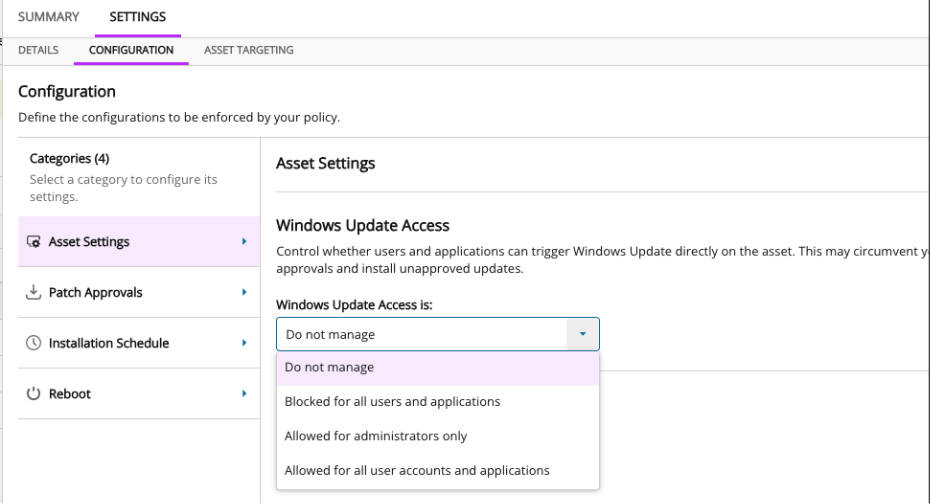
Control Windows Update user access settings
Modernizing your Windows patching approach
The new Windows patching engine is separate from the existing Patch Management engine in N-central and N-sight. It does not use or change your current Patch Management settings.
Although both engines can run on the same asset, we do not recommend this for most environments. Conflicting schedules, approvals, and reboot settings can cause inconsistent scan results, failed installations, and unnecessary reboot attempts.
You don’t need to make the move immediately. Explore Windows patch policies and experience the new approach before deciding when to transition. When you’re ready to move an asset, we recommend choosing one patching engine to manage it rather than running both side by side.
Looking ahead
We’re already working on the next set of Windows patching capabilities, including:
- Wake Device to Patch: wake devices that are asleep so they don’t miss their patch window
- Approval Delays: hold newly released patches for a set period before they’re approved
- More scheduling options, including Patch Tuesday offsetting
- Patch Reports: reporting on patch status and compliance
- Patch Monitors: alert on patching issues and failures
- Patch Co-workers
With one patch policy experience across Windows, macOS, and Linux, you can manage and secure more of your environment through a modern approach built for AI-accelerated patch and vulnerability management.
You must be logged in to post a comment.