
This release introduces a set of improvements to how service items and service plans are managed in MSP Manager. The updates focus on three areas: better visibility into expired service items, uninterrupted ticketing workflows, and greater flexibility when configuring the lifecycle of service plans.
What’s New
- Expired Service Item Indicator on Ticket List and Ticket Editor
- Ticket Creation Allowed for Expired Service Items
- Never Expiring (Auto-Extended) Service Items
- Improved Service Plan Duration Management
Feature Details
Expired Service Item Indicator on Ticket List and Ticket Editor
Tickets associated with expired service items are now clearly flagged directly in the Ticket List and Ticket Editor. You no longer need to navigate to the service plan to check whether a service item is still active — the indicator is visible right where you’re already working.

This makes it easier to catch expired agreements during day-to-day support operations and prioritise any renewals or follow-ups without disrupting your workflow.
Ticket Creation Allowed for Expired Service Items
You can now create tickets against service items that have expired. Previously, an expired service item could block ticket creation, forcing teams to pause work or use workarounds while a contract renewal was in progress.
With this change, support operations continue uninterrupted. Tickets can be logged, tracked, and resolved regardless of the service item’s expiration status, giving your team the flexibility to keep working while commercial or renewal discussions are handled separately.
Note: This change applies to ticket creation and tracking only. For billing purposes, service items still need to be active and up to date. If you rely on service items for billing, ensure they are renewed or extended to avoid any gaps in billable time tracking.
Never Expiring (Auto-Extended) Service Items
Service items can now be configured to never expire. This is designed for ongoing or recurring services where a hard expiration date doesn’t make practical sense — think managed services, monitoring agreements, or any long-term engagement without a defined end date.
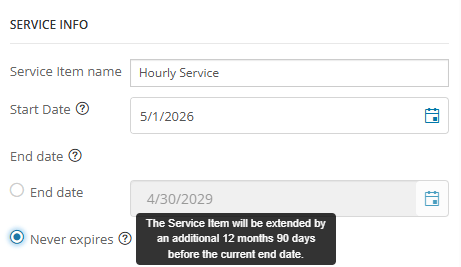
When a service item is set to never expire, it is automatically extended for another 12 months, 90 days before its expiration date. This means the service item stays active indefinitely with no manual intervention required. This removes a recurring administrative task and reduces the risk of service items lapsing unintentionally.
Improved Service Plan Duration Management
Managing service plan lifecycles is now more flexible. You can configure and switch between three modes for any service item:
- Duration-based — define the service item by a set period (e.g., 12 months from activation)
- End-date-based — set a specific calendar date for expiration
- Never expires — keep the service item active indefinitely
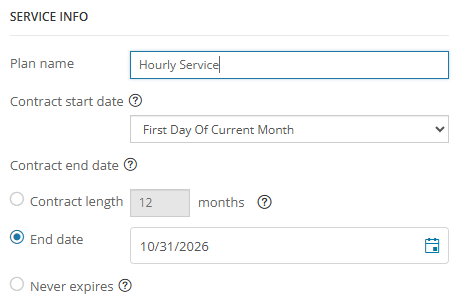
These options can be adjusted as your customer agreements evolve, making it easier to align MSP Manager with different billing models and contract structures without needing workarounds or manual maintenance.
You must be logged in to post a comment.