
Build Number: 2026.4.1.39
Last Updated: November 16th, 2026
N-central 2026.4 Hotfix 3 – Security Update
N-central 2026.4 Hotfix 3 is a critical security update. It includes a number of security patches and fixes that improve the overall security of N-central. This hotfix adds the following changes, in addition to those delivered in Hotfix 2:
- Authentication and access control. We have added missing authentication and permission checks to additional server operations.
- Agent and Probe security. We have improved how Agents and Probes authenticate with, and communicate to, the N-central server, including session handling. This is communication from Agents and Probes to the N-central server. It is separate from the Agent-to-Probe communication changes in Hotfix 2.
- File and import handling. We have added additional validation to file publishing, file path, and XML import handling.
- Server hardening. We have improved further server components, including how the server handles incoming requests and makes outbound connections.
- Legacy APIs. We have removed the configuration option for legacy APIs, and legacy APIs are now permanently blocked.
- User management improvements. We have made improvements to how user accounts are managed and secured.
To keep your environment protected, customers running on-premise N-central deployments should upgrade their servers as soon as possible. Hosted N-central servers are upgraded by N-able. All customers, hosted and on-premise, must upgrade all of their Agents and Probes to the latest version to be fully protected. Agents and Probes that are not upgraded are susceptible to impersonation.
This hotfix builds on the existing N-central 2026.4 Hotfix 2 release and includes everything delivered in it. To see what earlier releases contain, see the N-central 2026.4 Hotfix 2 Release Notes, the N-central 2026.4 Hotfix 1 Release Notes, and the N-central 2026.4 Release Notes.
Download links:
Appliance Session Hardening
N-central 2026.4 Hotfix 3 improves how N-central verifies and manages the Agents that connect to it. This update helps protect against Agent impersonation and adds new controls so that administrators can review and manage Agents that N-central has made inactive.
Highlights:
- Improved Agent verification. N-central now performs additional checks when an Agent connects.
- Inactive Assets tab. A new Inactive Assets tab under Configuration > Asset Discovery > Discovered Assets lists the Agents that are inactive, next to the active Agent for the same device. Every column can be filtered.
- Manage inactive Agents. Administrators can use Set Active to change which Agent is active for a device, Delete to remove inactive Agents, and Export to save the list to CSV or PDF. These actions are logged for audit.
- Network setup controls. The Network setup page has new options that let administrators manage how inactive Agents are handled. Changes take effect straight away.
- Device identification requirement. Devices now depend on either the SMBIOS ID or the machine ID being available in order to communicate with N-central. If both are missing, N-central rejects the connection.
Customer Benefits:
- Stronger protection against Agent impersonation, and greater confidence in the Agents that connect to your N-central server.
- One place to review, restore, or remove inactive Agents.
- Available for both CMMC and non-CMMC deployments.
What you need to do: To be fully protected, upgrade all of your Agents and Probes to the latest version, 2026.4.1 HF3. Agents and Probes that are not upgraded are susceptible to impersonation. After upgrading, allow time for your Agents to reconnect, then review the Inactive Assets tab for any Agents that need attention. The tab fills in as Agents reconnect after an upgrade, so it may be empty at first. An Agent that has been offline for a long time may need to be made active again with Set Active once it returns.
What’s new: Inactive Assets tab and Network setup options
We have added two new areas to N-central in this release. They give administrators control over Agents that N-central has made inactive.
Inactive Assets tab
We have added an Inactive Assets tab to Discovered Assets. It lists the Agents that N-central has made inactive, and shows each one next to the active Agent for the same device. You can filter every column, so you can find a device quickly. After you upgrade, the tab fills in as Agents reconnect.
Agents may find themselves in an inactive state for some of the following reasons:
- The machine was cloned (for example, a virtual machine copied from a template).
- The machine was re-imaged or rebuilt, and the Agent registered again.
- The Agent was installed a second time on the same machine.
- The N-central server was restored from a backup.
- An administrator made a different Agent active for the same device.
- The server was upgraded, and another Agent for the same device reconnected before this one.
- The Agent was offline for longer than its token remained valid, and requested a new token when it returned.
From this tab you can:
- Set Active. Make an inactive Agent the active Agent for a device. Select one Agent, then confirm. When you set an Agent active, N-central marks the Agent that was active until then as inactive. Only one Agent per appliance can be active at a time.
- Delete. Remove one or more inactive Agents. You are asked to confirm before anything is deleted.
- Export. Save the table to CSV or PDF.
These actions are logged for audit.
How to get there: Go to Configuration > Asset Discovery > Discovered Assets, then select the Inactive Assets tab.

Network setup options for inactive Agents
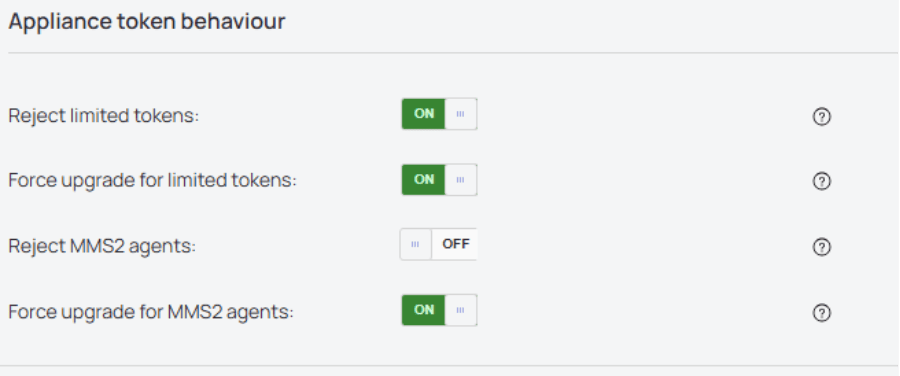
We have added new options to the Network setup page. They let you manage how N-central handles inactive Agents, including whether they are rejected or required to upgrade. Changes take effect straight away, so you do not need to restart the server.
How to get there: Go to Administration > Mail and Network Settings > Network Setup, then find the Appliance token behaviour section.
CVEs fixed in this release
N-central 2026.4 Hotfix 3 fixes the following vulnerabilities:
| CVE | Description |
| CVE-2026-129271 | N-central Patch Management Local Privilege Escalation |
| CVE-2026-129272 | MMS3 appliance authentication bypass via predictable passcode |
| CVE-2026-129273 | Audit Export syslog injection allows root command execution |
| CVE-2026-129274 | ServerMMS2 task result submission missing authentication |
| CVE-2026-129275 | repositoryItemGet missing authentication discloses policies |
| CVE-2026-129276 | ServerMMS2 asset data submission missing authentication |
| CVE-2026-129277 | ServerMMS maintenance action read missing authentication |
| CVE-2026-129278 | Take Control audit log tampering without authentication |
| CVE-2026-129279 | Password reset response discrepancy allows user enumeration |
| CVE-2026-129280 | ServerUI SOAP operations missing authorisation checks |
| CVE-2026-129281 | View-only users can set DeviceExecute configuration |
| CVE-2026-129282 | Test email sendmail argument injection, missing authorisation |
| CVE-2026-129283 | N-central custom service import XML external entity injection |
| CVE-2026-129284 | Report Manager and Data Export settings SSRF |
| CVE-2026-129285 | XMPP action response origin validation error |
| CVE-2026-129286 | SIS GenericFiles version path traversal leads to RCE |
| CVE-2026-129287 | SIS repository parser XML external entity injection |
Bug Fixes
This release also resolves the following issues:
| Category | Updated Summary | Issue Key |
| Core Platform | Summary: Corrected the server URL used for single sign-on sign-in and HTTPS redirects. Issue: On some 2026.4.1 builds, the sign-in page used the server’s local host name and port 443 instead of the configured N-central server address and UI port. This affected MSP single sign-on and other redirects whenever those values differed. Fix: Updated the sign-in page to use the configured server address and UI port. | NCCF-3359011 |
| Performance & Stability | Summary: Corrected an issue where a server component could slow down shortly after every start. Issue: On large servers, a server component’s code cache could fill within minutes of starting. Optimization was then switched off, which slowed some operations, such as asset exports, until the next restart. Fix: Updated the server configuration to improve performance after startup. | NCCF-3299655 |
Known Issues
- Remote control is not available. Remote control functionality other than Take Control is disabled. Take Control continues to work as expected.
- Intune integration is blocked. The Intune integration is currently blocked.
Additional Information
This release builds on and supersedes N-central 2026.4 (build 2026.4.0.27), N-central 2026.4 Hotfix 1 (build 2026.4.0.32), and N-central 2026.4 Hotfix 2 (build 2026.4.1.26). To learn what is included in each of those releases, see the N-central 2026.4 Hotfix 2 Release Notes, the N-central 2026.4 Hotfix 1 Release Notes, and the N-central 2026.4 Release Notes.
Hosted N-central – No server action required
If you are on an N-central hosted instance (NCOD), N-able will upgrade your server for you. You do not need to upgrade your server. You must still upgrade your Agents and Probes.
N-central (on-premise) – How do I upgrade to the hotfix?
On-premise customers must upgrade their own servers, and must also upgrade their Agents and Probes.
- Download and upgrade to 2026.4.1.39 using the instructions provided below and, on the N-able support portal. If you need assistance with the upgrade process, please contact our support team at: https://me.n-able.com/s/
Supported Upgrade Paths
Upgrade directly to 2026.4.1.39 from:
- 2025.4
- 2026.1
- 2026.2
- 2026.3
- 2026.3.1 (Hotfix 1)
- 2026.3.1 (Hotfix 2)
- 2026.3.1 (Hotfix 3)
- 2026.3.1 (Hotfix 4)
- 2026.4
- 2026.4 (Hotfix 1, build 2026.4.0.32)
- 2026.4 (Hotfix 2, build 2026.4.1.26)
If you are on an older version, we recommend you upgrade to any of the builds above, then upgrade to this hotfix version ASAP. For more information, see the above section on Upgrade path for legacy N-central versions.
If you are unsure of what to do, you can contact support directly.
Do I need to update my agents too?
Yes. Both hosted and on-premise customers need to upgrade their Agents and Probes. To be fully protected, you must upgrade all of your Agents and Probes to the latest version, 2026.4.1 HF3, whether or not you have already upgraded them to Hotfix 2. Agents and Probes that are not upgraded are susceptible to impersonation.
The security fixes in this release improve how Agents and Probes communicate to the N-central server. Hotfix 2 was different: it improved communication between Agents and Probes. If you have not yet upgraded your Agents and Probes to Hotfix 2, the Agent-to-Probe compatibility rules in the N-central 2026.4 Hotfix 2 Release Notes apply to your environment
For More Information:
- Support: [https://me.n-able.com/s/]
- Uptime Page: [https://uptime.n-able.com/]
You must be logged in to post a comment.