
This exciting release expands N-zo with three practical ways to help technicians find answers faster and work with greater confidence. Asset Activity provides context on device activity, Asset Tags functions make it easier to use and understand tags, and the Asset Selector helps technicians choose the right endpoint before asking a question. Together, these capabilities reduce manual investigation and help Partners turn asset data into clear, useful answers.
Asset Activities In N-zo
Building on the Asset Activity service release, N-zo can now use asset activity data to help technicians troubleshoot endpoints and understand what happened across managed environments.
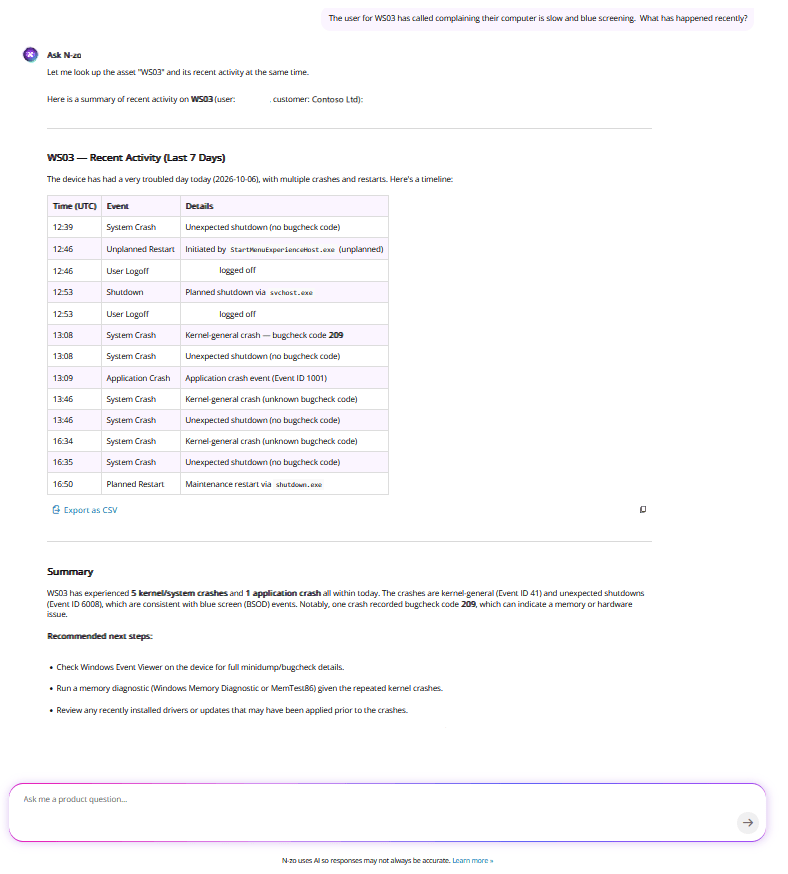
Ask questions in plain language about device logins, crashes, reboots, and unexpected shutdowns without manually checking individual devices.
Use N-zo to investigate activity on a specific endpoint, compare events across devices, or identify trends that need attention. For example:
- Which devices had the most failed login attempts this week?
- Compare reboots and shutdowns on TS6 and DC2.
- Show all system crashes and unexpected shutdowns from the last 7 days.
N-zo can help technicians:
- Identify devices with recurring crashes or shutdowns
- Review successful and failed login activity on devices
- Track logoffs, workstation locks, and unlocks
- Compare activity across devices and time periods
This can provide valuable context when investigating helpdesk tickets, responding to monitoring alerts, and identifying broader issues across similar devices.
Asset activity data currently includes:
- Successful and failed logins on devices
- User-initiated logoffs
- Workstation locks and unlocks
- Application and system crashes
- Unexpected shutdowns
Activity data is collected on a 30-minute cycle.
Asset tags in N-zo
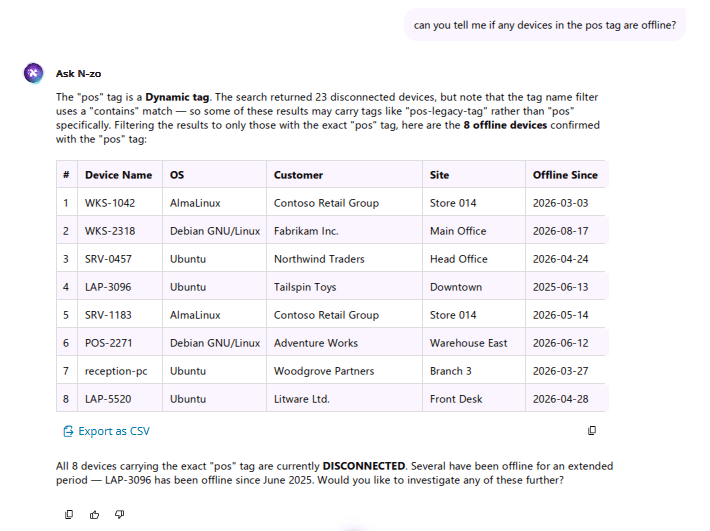
N-zo can now help technicians understand and analyze asset tags across their managed environments. Instead of manually searching tag lists or filtering devices one at a time, technicians can ask questions in plain language about static and dynamic tags, tag categories, tag usage, and the devices associated with them.
Use N-zo to understand how tags are being used, find devices with specific tag combinations, or identify assets that may be missing expected tags. For example:
- What are the most-used tags in my organization?
- List Windows devices tagged VIP
- Show me all dynamic tags
- Show me all untagged assets
- Show devices with both Critical and Windows Devices tags
N-zo can help technicians identify the most and least-used tags, compare tag usage across organizations, and locate devices based on multiple tag conditions.
Better together: combine tags with other N-zo data
Asset tags become even more valuable when N-zo brings different types of data together in a single question. Tags can provide the context for which devices matter, while capabilities such as Asset Activity can help explain what has been happening on those devices.
For example: “Have any of my assets tagged ‘VIP’ had a blue screen in the last 14 days?”
Asset Selector
The new asset selector helps technicians find the right device quickly and confidently. When a technician types “@” in an N-zo chat, N-zo provides search suggestions to help locate and select the correct asset.
This is especially valuable in environments where similar device names exist across multiple customers. By confirming the intended asset before a query or action is taken, technicians can reduce mistakes, save time, and work with greater confidence.
Turn Asset Data into Answers
For organizations already using N-zo, these capabilities expand the value of AI-assisted troubleshooting. For those evaluating how AI can support technician workflows, they offer a practical example of how faster access to asset data and context can help reduce investigation time and improve operational efficiency.
You must be logged in to post a comment.