
As we are continuing to add more information to the Ecoverse Assets View, we want to make it easier for users in the North Pane to access this additional information. New Metrics (CPU and Memory Usage) were recently released and the below features are on the way:
- Asset activities view
- New scripting
- Patch and Vulnerabilities information
- Installed software
- Additional asset data such as OS Build and Codename, Reboot required status and more
To make this information more easily accessible, we enabled deeplinking from the North Pane to a specific device’s asset details within the Assets View, as mentioned here.
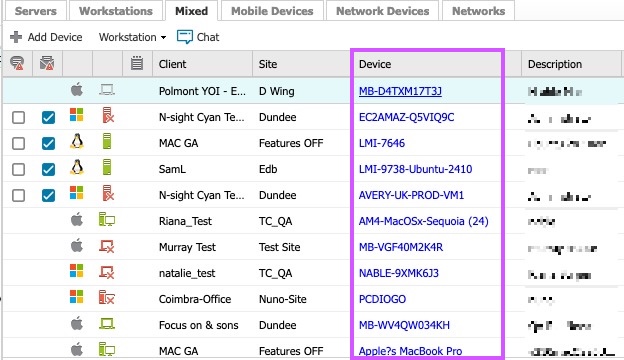
We have had positive comments on this improvement and are glad to see partners starting to incorporate it into their workflows. We have also had feedback that the implementation has disrupted some long-established work patterns, so we are making a couple of improvements to the user experience by updating the clickable hyperlinking to just the device name text, rather than the column cell. This should improve accidental clicks and make it easy to select and copy the device name. Note that you can click anywhere on the device row to select a device and see its information in the south pane.
We appreciate your feedback, and will continue to engage with partners as we introduce new functionality and incorporate some of the new Ecoverse features and options.
* Note, you made need to do a browser refresh to see the update to the hyperlink.
Edit/Delete Checks Like This – Multiple Selection Improvement
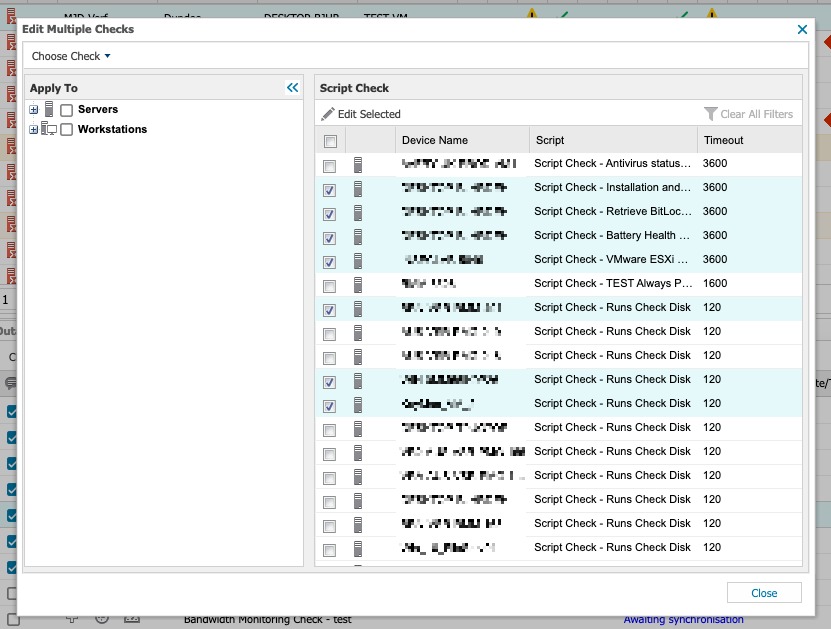
Following partner feedback via the N-ableMe Ideas page, we have made improvements to the ‘edit/delete checks like this’ user experience, by allowing users to multiple select using the entire row, rather than just the checkbox. Previously, user’s workflows were disrupted when multiple devices were selected and accidentally clicking outside of the checkbox cleared the entire selection.
We are continuing to monitor the N-ableMe Ideas page for future development considerations – please keep the ideas and votes coming!
You must be logged in to post a comment.