
N-central 2024.6.0.19
Download link (login required)
Discover What’s New in N-central 2024.6
The latest release of N-central, version 2024.6, is packed with powerful updates that enhance efficiency, boost security, and improve the overall user experience. These features are designed to empower our partners to deliver top-notch services while simplifying operations. Here’s a breakdown video of the exciting new additions, such as Audit logs, Agent last check in time & visibility of dependent services, multi-monitor support, chat-video-screen sharing out of session, new AI driven Developer Portal, Analytics reporting and so much more! Answering the call from top partner requests!
Audit Logging for Better Security & for SIEM Ingestion
Stay on top of user activity with the ability to export audit logs to a Syslog server. These logs can then be integrated into SIEM solutions for advanced monitoring and analysis. Additional audit data will be coming in future releases.
Why It Matters:
N-central partners can leverage our audit log data, connect to their event or SIEM solutions of choice to:
- Audit Trail: Maintain a clear record of user actions to ensure compliance and accountability.
- Real-Time Alerts: Get notified of potential threats for swift action.
- Enhanced Security: Detect unauthorized access patterns proactively.
Get started: Administration >> Audit Export

Improved Agent Visibility
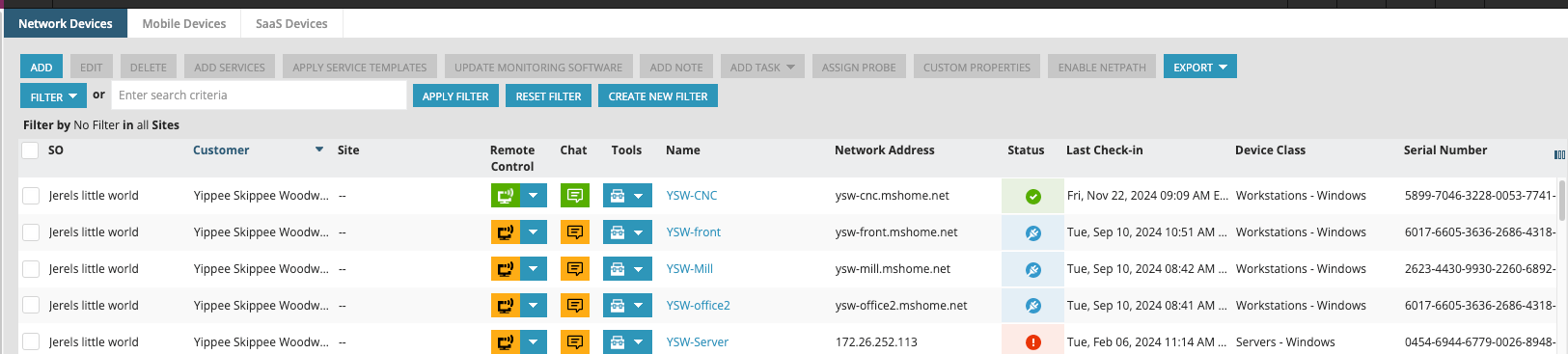
Get greater clarity on device activity with the addition of Agent Last Check-in timestamps in All Devices, Device Details views and during discovery.
Features:
- Last Check-in Time: Instantly identify devices that need attention.
- Discovery Check Status: View the results of device discovery checks, such as WMI, SNMP, and SSH, before importing devices. This helps avoid compatibility issues and saves time.

Enhanced Asset Views: More Data, Better Insights
Asset Views just got a significant upgrade! With new features aimed at improving data visibility and efficiency, managing devices has never been easier.
Key Features:
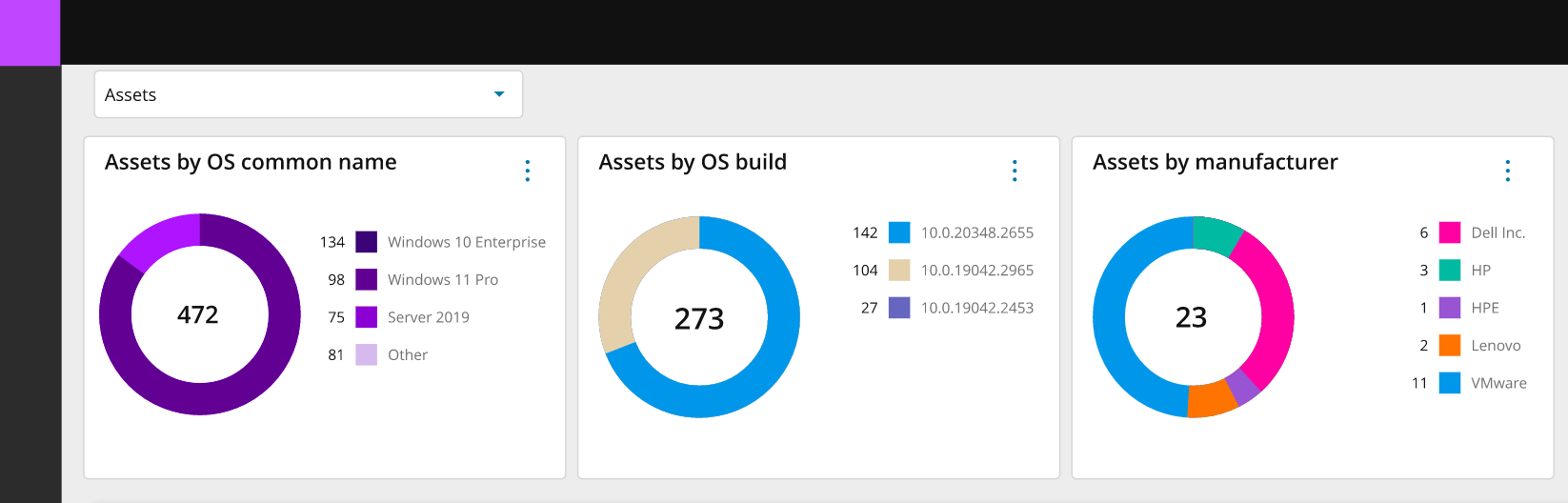
- 19 New Data Columns: Access detailed information like CPU specs, OS install dates, MAC addresses, logged-in users, device statuses, and even cloud-related data (e.g., Azure Region, ID, size, and subscription).
- Data Visualizations: See your data summarized in visual formats like donuts and bar charts for a clearer understanding of trends.
- Custom Views: Save and switch between personalized views to focus on the metrics that matter most to your workflow.
- Modern Agent Linux Support: Our modern agent will now be supported on linux devices. You will now be able to view your linux devices in the new Asset Views. (learn more)

On-Premise Preview:
For partners using on-premise N-central instances, Asset Views are now available! After upgrading to 24.6, adopting N-able Login (with or without Entra ID), and enabling Analytics, you’ll gain access to this powerful tool and drive technician efficiency.
Multi-Instance Visibility:
In addition to the existing Asset Views functionality we are also introducing the ability to manage multiple N-central instances from a single screen. This new enhancement provides greater scale, time savings, and makes cross-instance device management seamless. This is a game-changer for partners handling large or distributed networks.

Take Control – Out-of-Session Chat and Video Support
With N-central 24.6, interacting with end users just got easier and more flexible. The new Chat and Video Chat feature allows technicians to connect with end users directly from the Device Details view, without initiating a full Take Control session.
Key Features:
- Chat, Video Chat, and Screen Sharing: Communicate with end users through a popup launched from the Device View, enabling real-time conversations, video calls, or quick screen-sharing sessions.
- Out-of-Session Support: Start chats or video calls without the need for a remote session, providing a non-intrusive way to engage with users.
- Quick Access: Save time with faster communication tools, perfect for troubleshooting or providing updates without disrupting workflows.
This feature ensures seamless interactions with end users, helping technicians diagnose and resolve issues efficiently while maintaining a smooth experience for the end user.

Take Control – Multi-Monitor Support
Managing remote sessions is now more streamlined with the introduction of Multi-Monitor Support in N-central 24.6. This feature allows technicians to seamlessly interact with end users who utilize multiple monitors, providing an efficient and accurate remote troubleshooting experience.
Key Features:
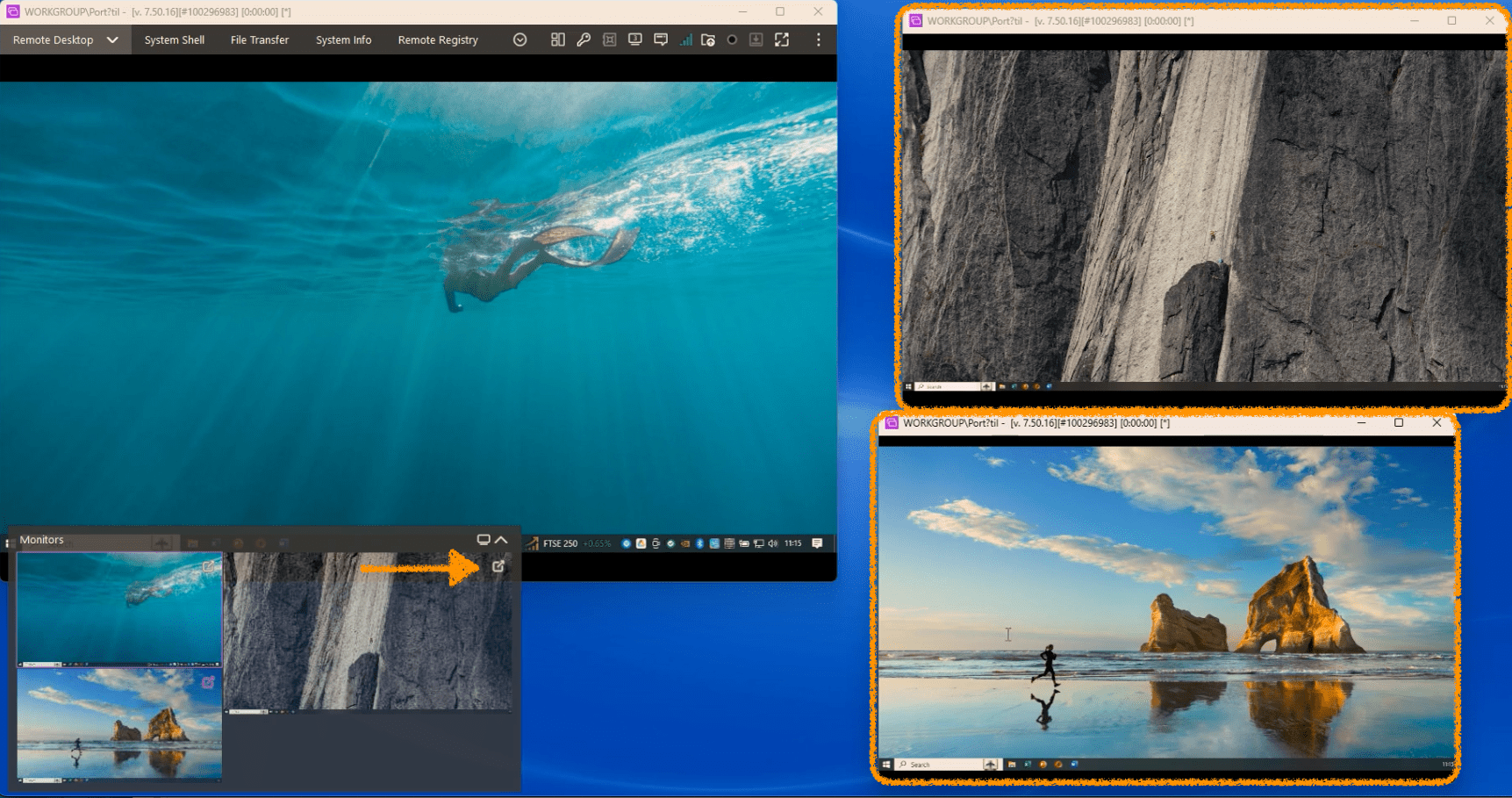
- Seamless Monitor Switching: Easily view and switch between multiple monitors during a session with just one click, ensuring uninterrupted support.
- Real Monitor Layouts: Thumbnails display the actual monitor positions configured by the end user, making navigation intuitive and reducing guesswork.
This enhancement delivers a clearer view of the user’s setup, enabling technicians to work faster and more effectively while minimizing disruptions during remote sessions.
Support Toolkit for Remote Sessions
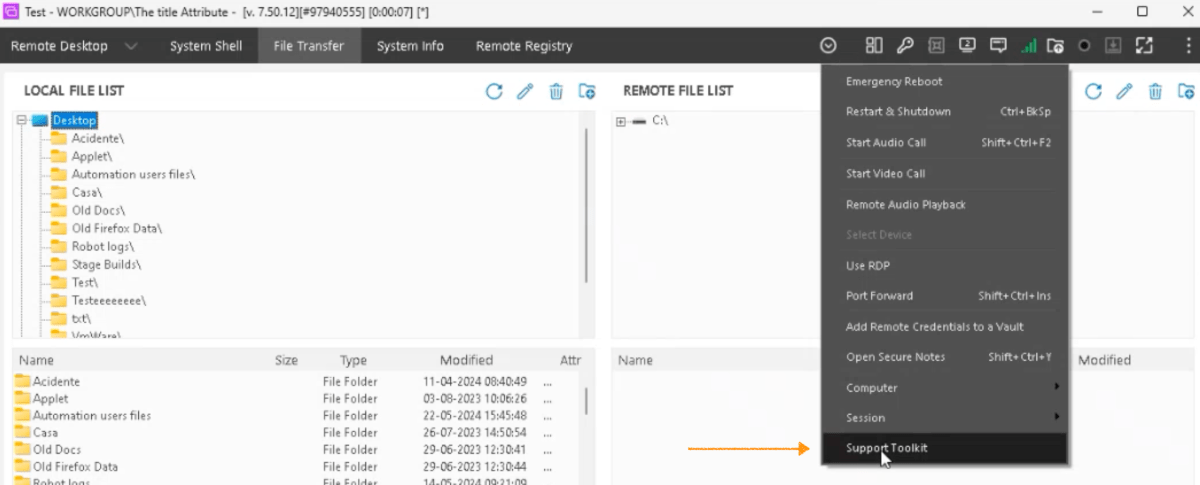
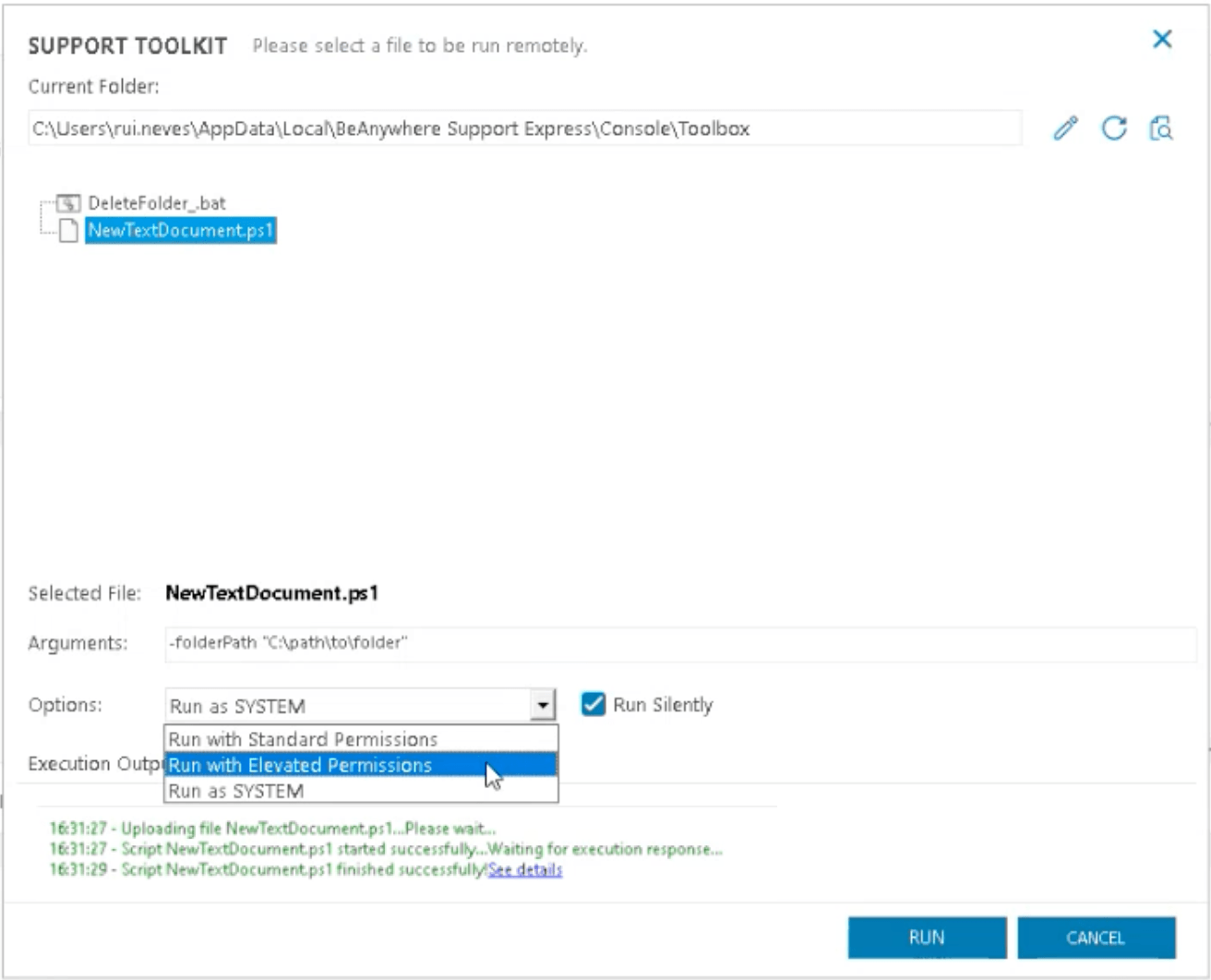
The Support Toolkit streamlines troubleshooting by centralizing your daily carry scripts, applications, and essential files in one place.
Why You’ll Love It:
- Access tools directly during remote sessions for faster resolutions.
- Eliminate the need to search for files or scripts on the fly.
- Uniquely allowing for script parameters as well as “run as” selection
FileVault Management for macOS Devices
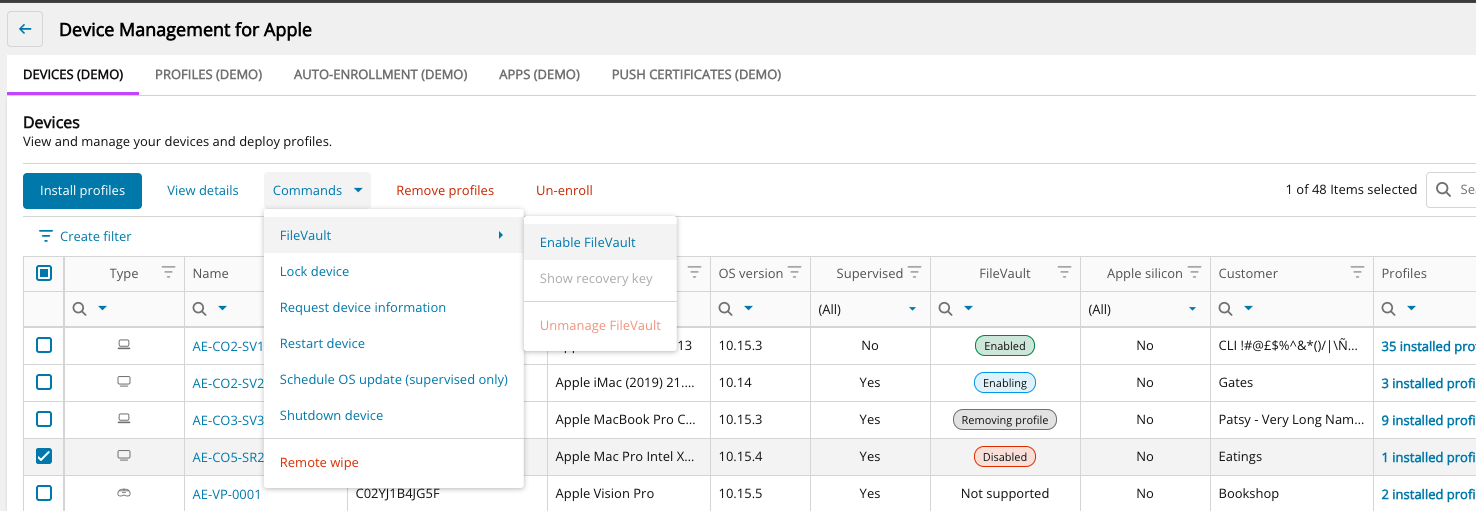
We’ve made encryption management simple and centralized with the new FileVault Management feature.
Capabilities:
- Enable and enforce FileVault encryption across macOS devices.
- Monitor encryption status in real time.
- Manage recovery keys to ensure secure access when needed.
API Enhancements for Automation
New APIs make it easier to manage patch maintenance windows, warranty information, and agent visibility.
What’s New:
- Patch Maintenance Window: Add, modify, and retrieve patching schedules.
- Warranty Information: Efficiently manage device warranties.
- Agent Last Check-in Time: Quickly identify offline devices.
Analytics Reporting – Preview
We’re happy to announce that with N-central version 2024.6, Analytics now offers an improved ability to print reports to provide internal and external status updates, e.g. as part of your billing cycle. This will kick off in preview shortly after release and will roll out over the coming weeks.
Within Analytics, choose to interact with your data through dashboards via the ‘dashboards’ tab, or produce printed graphs and tables via the ‘reports’ tab.
This first release includes the following reports to help you and your customers understand the status of their managed devices:
- AV Status
- Disk Usage Trending
- Hardware Inventory
- Last Boot-Up Time and Logged-In User
- Managed Devices Summary
- Managed Devices by OS
- Network Assessment Report
- Remote Control Usage
- Service Availability Report
- Software Inventory Report
To get started, navigate to Analytics > Reports > choose a report > set the parameters you want > expand the export button in the top right corner and choose your preferred format.
All reports can be exported to either Excel, CSV, Word, PDF, or PowerPoint so can be either shared as is, or further formatted if needed.

Introducing the Developer Portal Preview
We’re thrilled to unveil the new Developer Portal, now available in preview. This portal combines advanced features like Swagger, sandbox environments, and AI tools to streamline API integration and development. Whether you’re a beginner or an experienced developer, this portal enhances efficiency and innovation.
Key Features of the Developer Portal
- Interactive API Documentation: Access detailed guides and reference materials, test endpoints directly, and generate code snippets in your preferred programming language.
- Enhanced Recipes (aka Automation Cookbook): Explore over hundreds of ported scripts and guides with added walkthroughs to explain the code’s functionality, helping you learn as you implement.
- AI-Powered Script Creation: Describe your requirements, and the portal generates scripts using AI, fully integrated with backend APIs for quick, accurate results.
Get Started today: N-able Developer Portal
Powered with readme.io (trust center)
These updates are designed with you, our valued MSP partners, in mind—helping you work smarter, faster, and more securely. Be sure to upgrade to 2024.6 today to take full advantage of these game-changing features!
You must be logged in to post a comment.